

Forum Replies Created
-
AuthorPosts
-
Vladimir
Keymaster“Admin menu” shows menu items available to the selected role according to permissions granted to this role. When you need to look what permission/capability is required for some menu item, open “Admin menu” for “administrator” role, which has all existing capability by default.
Table press is protected by these user capabilities:
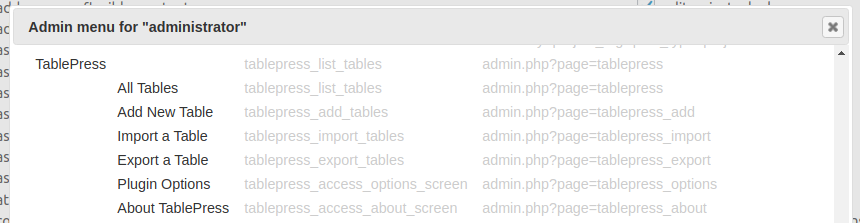 Keymaster
WordPress shows admin menu items on the base of capabilities granted to a role or directly to a user. You should work with capabilities 1st to show/hide admin menu.
Often we meet a situation when we need to hide from user some part of admin menu, but they use the same capability, like ‘manage_options’. For example, you have 2 plugins which create menus A and B protected by the same capability manage_options. You wish to show for a role menu A, but not show menu B. You can not revoke ‘manage_options’ from a role, as it will lose access to menu A too. In this case and only in this case you may use admin menu blocking feature from URE Pro. URE Pro works on the base of WordPress permissions system and does not try to replace it.
KeymasterGo to Users->User Role Editor, select ‘Editor’ role, click ‘Admin Menu’.
Click: “Selected” at the top of the window and switch OFF all checkboxes to the left from the menu items. You may use top checkbox (to the left from “Menu” word” to turn ON/OFF all checkboxes at once. Click ‘Update’ to save changes.When nothing is selected, nothing is blocked.
KeymasterRead carefully the “Technical Details” part of the “Admin menu access” documentation page. It contains an explanation and possible workaround for this problem.
KeymasterHi, do you use “Admin menu access” add-on for this role?
If Yes, try to switch it Off temporally. Will it resolve a problem?16/10/2019 at 16:41 in reply to: Give a role access to edit a spesific menu in Appearance > Menu #6038KeymasterHi edering,
I re-started work on this feature recently. Progress is about 2/3. I plan to include it into the next update (possibly November).
16/10/2019 at 15:52 in reply to: Subscriber permissions require the "delete users" permission to be checked #6036KeymasterWhat plugin do you use in order to restrict content view?
KeymasterThis function itself is not needed without filter line. So you may remove a whole part of the code: function with the filter line together.
KeymasterHi,
Look at the Other roles access add-on. You may block access to the other roles for the selected role.
KeymasterYes,
$restrict_it = false;When filter returns FALSE, URE does not apply any restrictions for this post type.
Why do not comment/remove exclude_posts_from_edit_news_restrictions() from the filter?
User will still can add new news, but only to this single category ‘McCaskey’ and see at the news list news only with this category.KeymasterI found a reason of the problem, when edit restriction was not applied to the ‘page’ post type. It’s my own code I recommended to you to insert into functions.php. As you used it 2 time as filter. 2nd time it was executed with not ‘page’ post type as an input parameter, but with value replace by TRUE after the 1st execution. Replace your code in functions.php with this updated version:
// URE to allow Scholarship Role access to Scholarship plugin while restricting Pages for user
add_filter('ure_restrict_edit_post_type', 'exclude_posts_from_edit_restrictions', 10, 1);
function exclude_posts_from_edit_restrictions($post_type) {
  $restrict_it =  $post_type;
  $user = wp_get_current_user();
  if ( empty( $user) || !is_array( $user->roles ) ) {
      return $restrict_it;
  }
  if ( in_array( 'scholarships', $user->roles ) ) {  // Role ID
      if ($post_type=='scholarship') {  // CPT ID
        $restrict_it = false;
      }
  }
  return $restrict_it;
}
// end URE to allow Scholarship Role access

// URE to allow News Role access to News plugin while restricting Pages for user
add_filter('ure_restrict_edit_post_type', 'exclude_posts_from_edit_news_restrictions', 10, 1);
function exclude_posts_from_edit_news_restrictions($post_type) {
  $restrict_it = $post_type;
  $user = wp_get_current_user();
  if ( empty( $user) || !is_array( $user->roles ) ) {
      return $restrict_it;
  }
  if ( in_array( 'news', $user->roles ) ) {  // Role ID
      if ($post_type==='news') {  // CPT ID
        $restrict_it = false;
      }
  }

  return $restrict_it;
}
1) It does not changes post type argument for the next calls of this filter;
2) It does not user heavy weight current_user_can() function, which is not recommended to use when you need check role, not capability.KeymasterThank you.
There is a possible bug at URE Pro code which I should investigate and fix. At some conditions URE sends TRUE toure_restrict_edit_post_typeinstead of real post_type value. PHP evaluates ($post_type==’news’) expression as TRUE and switches off edit restrictions for pages too. This is a reason why user sees all pages instead of 1 allowed and its child page.Quick fix is to use exact type comparison operand ‘===’, like this:
‘
if ($post_type===’news’) { // CPT ID
‘KeymasterYou turned OFF edit restrictions for ‘news’ custom post type. This is a reason why user is not restricted edit this CPT by category you set at this user profile. As you comment/remove exclude_posts_from_edit_news_restrictions, user will still can add new news, but only to this single category and see at the news list news only with this category.
KeymasterUser with ‘edit restrictions’ should see at the post editor only “allowed” categories. If you allow 1 category, only that single category should be shown at the categories list. If it does not work as I described, I’m ready to check your settings online. I will need admin privileges for that. If this is possible, send credentials to support [at-sign] role-editor.com
KeymasterIs it possible to look at your site with admin privileges?
If Yes, send credentials to support [at-sign] role-editor.com -
AuthorPosts