

Forum Replies Created
-
AuthorPosts
-
Vladimir
KeymasterYou are right, I updated my previous answer: at “Additonal Modules” tab.
Correct: while plugin is network activated you have one global for the whole network default access error message.
If you network deactivate plugin and activate it individually for selected subsites, you can have individual for every subsite settings.
Other option – input custom shortcode as a network global access error message template. Then built a message individual for subsite inside a PHP processing that shortcode.
KeymasterYou can set a default access error message at the “Setting->User Role Editor->Additional Modules” tab. URE will show it until you do not select ‘Show custom access error message’ for a restricted post at the post editor page.
Yes you can use shortcode inside content view access error message.
KeymasterThanks. I answered to you by email. Let me know if you need a further help.
I repeat my answer here if it will be useful for someone other:General steps when you don’t know what permissions are required for some admin menu items:
– Open Users->User Role Editor
– Select ‘Administrator’ role
– Open “Admin menu”
– Find needed menu item and look what capability protects it. “WP Quiz->Players” is protected by ‘manage_options”.
– Close “Admin menu” window
– Select other role
– Add required capability (‘manage_options’ in this case) to this role
– Update it.
– Open ‘Admin menu’ for this role
– Block unneeded menu items for this role.KeymasterA problem is related to the paid add-on: https://wpstorelocator.co/add-ons/csv-manager/
Right? I need its copy for testing (use dropbox or similar). My email: support [at-sign] role-editor.com
Show me a screenshot of your admin menu item selection for this role.KeymasterYes, I need to make a closer look at admin area. Send credentials to support [at-sign]role-editor.com
Show a screenshot with marked areas, to which you wish provide access for a client.KeymasterI needed WP Store Locator for testing. I thought it’s a paid product. I got it. Thanks.
KeymasterI suppose that you use “Block not selected” model. URE Pro allows to use just the exact URL you selected at menu items list. URL you showed contains additional parameter ‘section’. This is a reason, why URE blocks this URL and redirects user to the 1st available item from admin menu.
Workaround:
1) Use ‘Block selected’ model, if it’s not critical for you.
or
2) Send me plugin copy (via dropbox, etc.). I will send you a code for custom filter, which will allow for URE to use ‘section’ parameter with edit.php for this custom post type.KeymasterI mean active theme, not activate. So you need to insert a code into a functions.php file of the active theme.
KeymasterUnfortunately, WPL plugin uses ‘administrator’ role instead of some user capability in order to protect its menu.
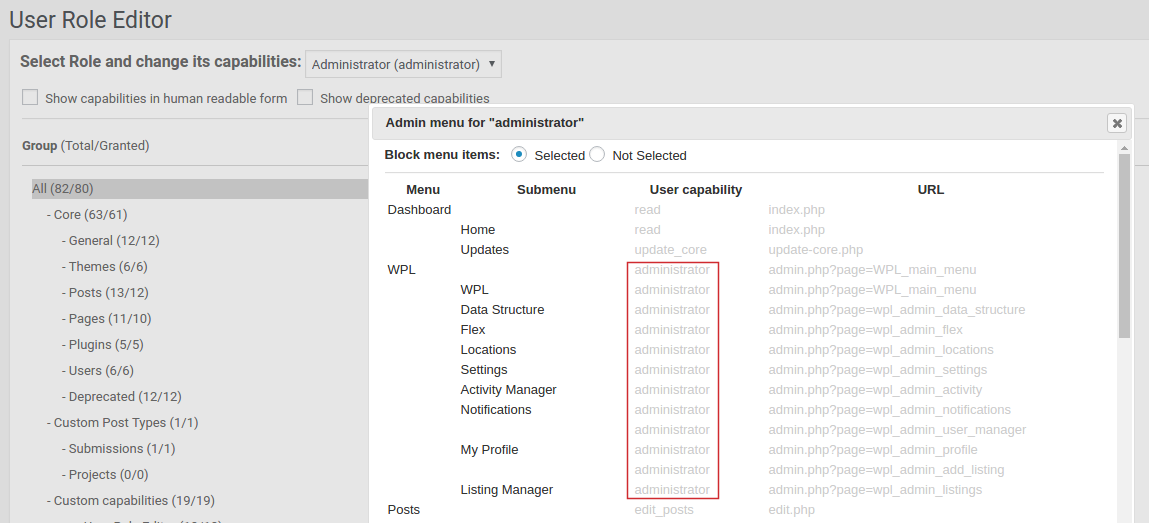
Only users with ‘administrator’ role have access to this menu. It’s not possible to change this editing user roles.
If you send me this plugin copy, I will look into its source code. Some plugins add custom filter, which allows to change how menu is protected.
Workaround:
1)replace ‘administrator’ at plugin source code with some custom capability. Contact plugin developers in order they consider to make the same change with a next update.
2) “Admin menu editor” WordPress plugin, which allows to replace ‘capabilities’ which used during admin menu definition.KeymasterSend them to support email, mentioned at a previous message.
Tell also, to what user do you wish to provide that access.KeymasterHi,
General steps:
1) Activate admin menu access add-on.
2) Go to ‘Users->User Role Editor’, select ‘administrator’ role.
3) Click ‘Admin menu’ button and find menus related to a ‘property listing’ plugin, check what capabilities are required for them (3rd column).
4) Select a role, under which your user will work. Grant those capabilities to this role. Look at admin menu. Block unneeded menu items if you find some.You can send me (support [at-sign] role-editor.com) a copy of “property listing manager” plugin (via dropbox or similar) and I will explain you what to do with it.
Or send admin login credentials. I can look at it on-line then.
KeymasterOK. I will investigate what’s going wrong in edit access restrictions with Sticky posts.
KeymasterA fix was included into URE Pro version 4.35.1
KeymasterNo problem. Thanks for the feedback.
I will publish an update with this fix.KeymasterPost counter for ‘Mine’ view was fixed also: “All (88), Mine (82)” now, instead of 2500+.
-
AuthorPosts