

Forum Replies Created
-
AuthorPosts
-
Vladimir
KeymasterExcuse for a delay with answer – I had a 2 weeks vacation.
You need to open post you wish to protect and select a role(s) to which you allow view it. Then select action for all visitors who does not have that role.
Post is excluded from all WordPress listings in case “Return HTTP 404 error” action is selected.
Did you try this option?KeymasterHi Bjorn,
I decided to postpone the 5.51 release until May, 15th.
It’s not a good idea to publish new version just before 2 weeks vacation, as I can not provide support at the period from May 2nd until May 14th.KeymasterI may look at your site on-line. If that’s applicable send administrator credentials to support [at-sign] role-editor.com and describe what user, to what post type, what categories should have edit access.
KeymasterI see. I thought you write about 2 roles only, as at the provided example. The only interactive way via WordPress UI is to process users with the same roles list group by group and grant them new roles list except the older one.
The only alternative – PHP script which will select all users with subscriber role and then revoke ‘subscriber’ role from them one by one.
KeymasterCan he edit the post without restrictions added?
What’s happening after you add “edit restrictions”?KeymasterYou have to take into account that ‘edit restrictions’ add-on should be used in order to restrict user’s editing access which he has already, not to provide to him something which he does not have.
Thus, user should be capable to edit posts and/or pages. Generally contributor is not allowed to edit published posts and posts from other authors.
Provide to a user permissions required to edit needed posts and/or pages. Then restrict the list of items available for editing to this user using one of the ways you listed above.KeymasterIt works at my side as expected. Try to use code below:
add_filter('wpseo_edit_advanced_metadata_roles', 'wpseo_edit_advanced_metadata_roles', 10, 1); function wpseo_edit_advanced_metadata_roles( $roles ) { $roles[] = 'editor'; return $roles; }KeymasterHi,
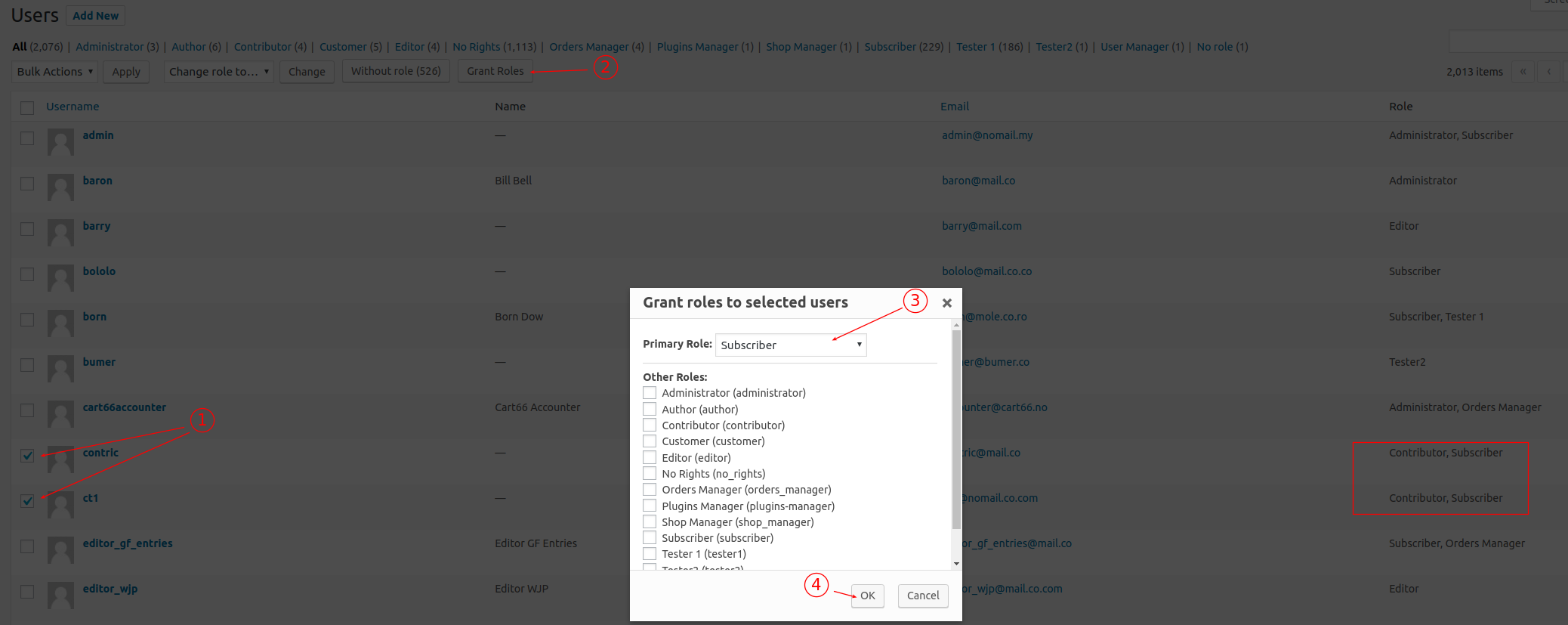
I suppose that you add roles to multiple users via “Grant Roles” button. Use the same button to revoke role(s) from the list of selected users. Look at the screenshot below.
 Keymaster
“Yoast SEO” has own capabilities manager, which removes all wpseo capabilities on plugin deactivation and adds them to the pre-defined list of roles on plugin activation.
There is a filter, using which it’s possible to tell “Yoast SEO” which capability to which role add/remove automatically on plugin activation/deactivation. /** * Filter: Allow changing roles that a capability is added to. * * @api array $roles The default roles to be filtered. */ $filtered = apply_filters( $capability . '_roles', $roles );For example with code below you will have ‘wpseo_manage_options’ capability granted to ‘editor’ role automatically on “Yoast SEO” plugin activation:
add_filter('wpseo_manage_options_roles', 'wpseo_manage_options_roles', 10, 1);

function wpseo_manage_options_roles( $roles ) {

    $roles[] = 'editor';

    return $roles;
}
You may add it to the active theme functions.php file or setup it as a Must Use plugin.
KeymasterHi,
Thanks for this report. I included the fix into development version 4.51.b2 (available for testing). I plan to publish it next week.
I don’t think it would be related to the users auto-logout though.
09/04/2019 at 13:39 in reply to: Enabling a non-Administrator role to view and promote users up to its own role #5626KeymasterMy test showed that WordPress itself does not limit access of user with list_users and promote_users capabilities in the role to any other role (‘Administrator’ role is hidden from such user by User Role Editor).
Look at this short video.So I still suppose that some code (external for WordPress) is involved (plugin or theme).
Did you try to deactivate all plugins temporally. Will be access of user promoter to other roles limited in the same manner?
05/04/2019 at 13:22 in reply to: Enabling a non-Administrator role to view and promote users up to its own role #5624KeymasterGenerally, WordPress roles does not have any built-in (higher/lower) hierarchy.
Were those ‘gold’, ‘silver’, ‘bronze’ added by you or by some membership plugin? If other plugin is involved, it may add own permissions restrictions. To check this assumption, deactivate that plugin and try to promote gold user by gold user again.
Let me know the result of your testing.28/03/2019 at 03:41 in reply to: Plugin access addon editing doesn't take effect immediately on new users. #5617KeymasterThanks for your constructive collaboration.
I found and fixed the issue, prevented to add-ons data copy to a new subsite in your case:
– Fix: WordPress multisite: add-ons data from the main site was not copied to a new subsite in case new subsite was created from front-end.Let’s try the next beta version: 4.50.4.b2.
25/03/2019 at 03:17 in reply to: Plugin access addon editing doesn't take effect immediately on new users. #5614KeymasterLet’s clarify the things:
2 things should be made together:
1) use beta version of URE which includes a fix;
2) properly install a custom code (you listed above).I see that your site uses currently the stable version of URE 4.50.3. It has a related issue after WordPress 5.1 release and discussed feature does not work under it.
-
AuthorPosts